EduSwap
How EduSwap works

A clearer way for schools to buy, sell, swap and donate resources

EduSwap gives schools a practical workflow for moving resources between education communities. Instead of relying on long email chains or scattered admin, schools can list items, browse what is available and take clearer next steps.

Whether your school wants to buy, sell, swap, donate or eventually lease equipment, the platform is designed to make the process easier to follow.

What schools do first

List equipment they no longer need, browse what is available, and identify practical value in books, tech, furniture, sports gear and more.

What happens next

EduSwap helps schools connect more clearly to buy, swap, donate or coordinate the next step without relying on long email chains.

What this page covers
The workflow, the transaction flow and the Premium unlocks

This page focuses on what schools actually do on EduSwap, not just why the platform exists.

Buy

Find practical equipment at a lower cost than buying new and stretch school budgets further.

Sell

Recover value from resources your school no longer needs instead of letting them sit unused.

Swap

Trade useful items between schools when budgets are tight but resources still have practical value.

Donate

Pass on equipment to where it can still be used and support a more circular school community.

Step by step

How schools use EduSwap in practice

1
List unused equipment

Schools can create listings for books, laptops, furniture, sports gear, STEM resources and more that are no longer being used.

2
Browse what is available

Other schools can search the marketplace by keyword or category to find practical resources already available in the education community.

3
Connect and coordinate

Schools can buy, sell, swap or donate with clearer next steps and less friction than relying on scattered emails or chance conversations.

4
Complete the next step

Depending on the listing type, schools can arrange collection, payment, donation, swap or the next stage of school-to-school coordination.

5
Keep resources moving

Useful items stay in circulation longer, schools save money, and less good equipment ends up sitting idle or going to landfill.

Marketplace view

What the school-to-school flow looks like

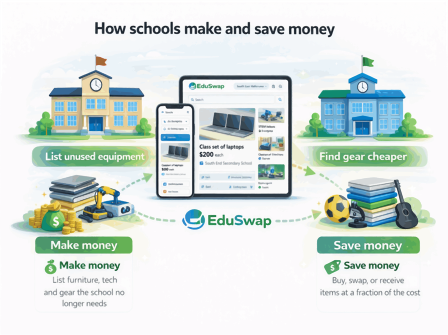
This is the basic EduSwap pattern: one school lists equipment, another school browses what is available, and the next step becomes much clearer.
1
List unused equipment
2
Browse the marketplace
3
Connect to buy, swap, donate or receive
How EduSwap works visually
Finance-friendly workflow

Clear school-to-school records, without messy admin

EduSwap helps structure the transaction properly, with clearer payment flow and automatic buyer invoice and seller transaction records built around real school finance expectations.
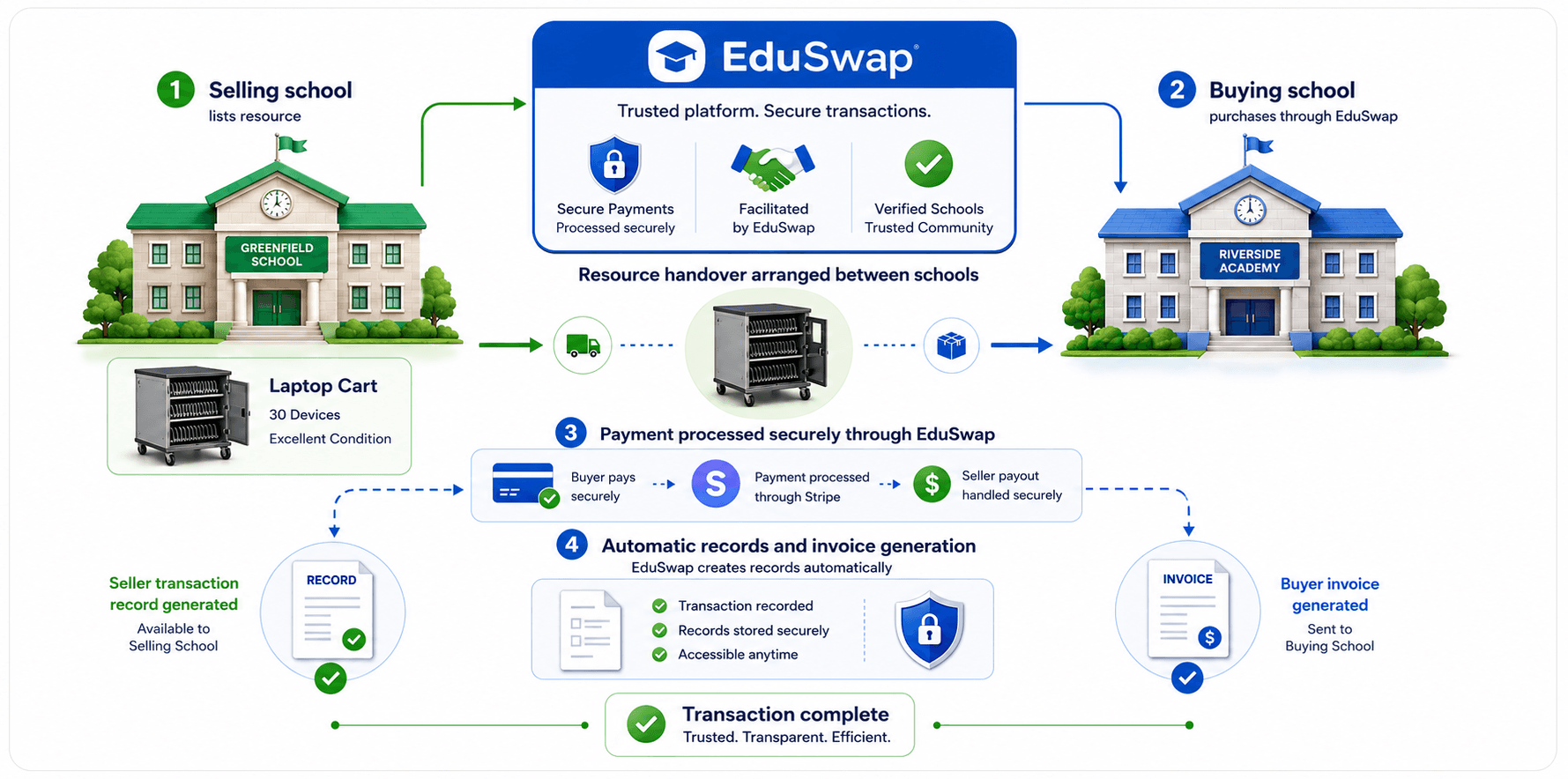
Buyer pays securely through EduSwap
Buyer invoice records are created automatically
Seller transaction records are available to the selling school
Schools get a cleaner, more finance-friendly workflow
For paid sales and leasing, EduSwap helps create a clearer transaction trail so schools are not left piecing together payment and invoice records manually.
Diagram showing how EduSwap facilitates a school-to-school transaction, with buyer invoice records and seller transaction records.
How schools make and save money using EduSwap
Why schools upgrade

What Premium unlocks for schools

Premium is for schools that want to move beyond basic browsing. It helps schools identify the right contact faster, coordinate next steps more clearly, and unlock additional transaction paths such as leasing.

Unlock school contact details for swaps and donations
Coordinate faster with clearer school-to-school communication
Create lease listings and earn from idle equipment
Recover value from underused assets already owned by your school
Want to see the plans? View pricing
Get started

Join a cleaner, smarter way to source school resources

Browse available items, list unused equipment, and help build a more connected school marketplace.